

 登录
登录
Ⅰ. Read and underline(Minmin 很喜欢爸爸送给他的礼物,写了几条小贴士来提醒自己安全使用电脑。大声朗读下列句子,在发 /k/ 的字母或字母组合下画线)
• Think before clicking. Strange links can harm the computer.
• Put the laptop on the desk, not on the bed.
• Keep the keyboard clean and dry.
• Keep password secret—never share it!
• Check for viruses (病毒) often to stop hack (侵入) attacks.
QUICK TIPS
一些常见发 /k/ 音的字母和字母组合:
• c-/k/ 如:cat, doctor, music
• k-/k/ 如:kite, baker, milk
• q-/k/ 如:quiet, liquid
• ck-/k/ 如:duck, check, black
• Think before clicking. Strange links can harm the computer.
• Put the laptop on the desk, not on the bed.
• Keep the keyboard clean and dry.
• Keep password secret—never share it!
• Check for viruses (病毒) often to stop hack (侵入) attacks.
QUICK TIPS
一些常见发 /k/ 音的字母和字母组合:
• c-/k/ 如:cat, doctor, music
• k-/k/ 如:kite, baker, milk
• q-/k/ 如:quiet, liquid
• ck-/k/ 如:duck, check, black
答案
• Think before clicking. Strange links can harm the computer.
• Put the laptop on the desk, not on the bed.
• Keep the keyboard clean and dry.
• Keep password secret—never share it!
• Check for viruses often to stop hack attacks.
• Put the laptop on the desk, not on the bed.
• Keep the keyboard clean and dry.
• Keep password secret—never share it!
• Check for viruses often to stop hack attacks.
解析
【分析】
本题要求在句子中发/k/音的字母或字母组合下画线,解题思路为:先明确题目给出的发/k/音的字母及字母组合(c、k、q、ck),再逐句分析每个单词的发音,找出对应发/k/的部分即可。
【解析】
逐句定位发/k/音的字母/字母组合:
1. Think before clicking. Strange links can harm the computer.(click的ck、can的c、computer的c发/k/)
2. Put the laptop on the desk, not on the bed.(desk的k发/k/)
3. Keep the keyboard clean and dry.(Keep的k、keyboard的k、clean的c发/k/)
4. Keep password secret—never share it!(Keep的k发/k/)
5. Check for viruses often to stop hack attacks.(Check的ck、hack的ck发/k/)
【答案】
• Think before clicking. Strange links can harm the computer.
• Put the laptop on the desk, not on the bed.
• Keep the keyboard clean and dry.
• Keep password secret—never share it!
• Check for viruses often to stop hack attacks.
【知识点】
英语字母发音;英语字母组合发音
【点评】
本题结合给定发音规则,考查学生对英语中发/k/音的字母及字母组合的识别能力,属于基础语音类题目,难度适中。
【难度系数】
0.5
本题要求在句子中发/k/音的字母或字母组合下画线,解题思路为:先明确题目给出的发/k/音的字母及字母组合(c、k、q、ck),再逐句分析每个单词的发音,找出对应发/k/的部分即可。
【解析】
逐句定位发/k/音的字母/字母组合:
1. Think before clicking. Strange links can harm the computer.(click的ck、can的c、computer的c发/k/)
2. Put the laptop on the desk, not on the bed.(desk的k发/k/)
3. Keep the keyboard clean and dry.(Keep的k、keyboard的k、clean的c发/k/)
4. Keep password secret—never share it!(Keep的k发/k/)
5. Check for viruses often to stop hack attacks.(Check的ck、hack的ck发/k/)
【答案】
• Think before clicking. Strange links can harm the computer.
• Put the laptop on the desk, not on the bed.
• Keep the keyboard clean and dry.
• Keep password secret—never share it!
• Check for viruses often to stop hack attacks.
【知识点】
英语字母发音;英语字母组合发音
【点评】
本题结合给定发音规则,考查学生对英语中发/k/音的字母及字母组合的识别能力,属于基础语音类题目,难度适中。
【难度系数】
0.5
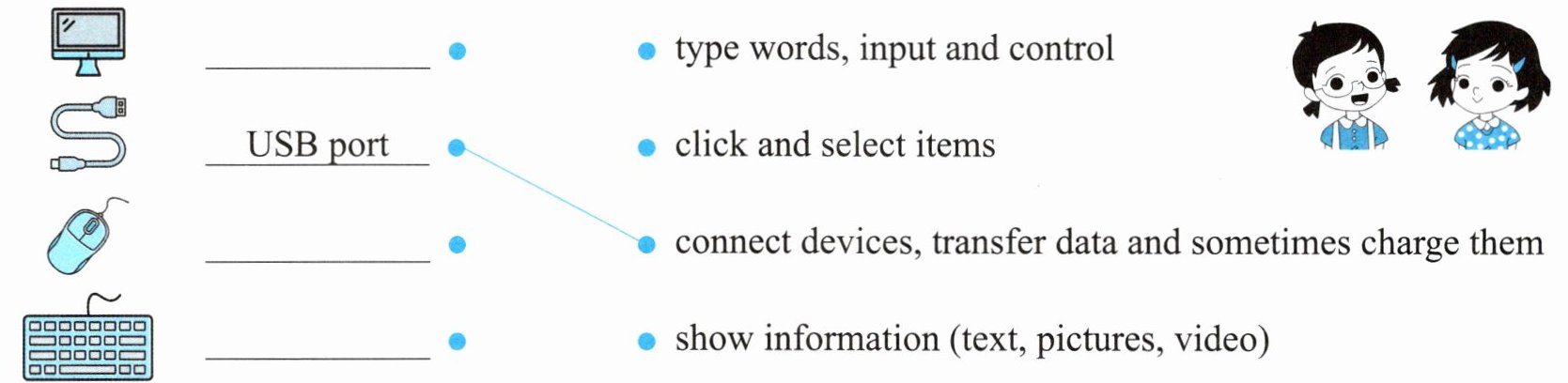
Ⅱ. Read, write and match(Shenshen 在给 Xinxin 讲解电脑各部件的功能。根据图片填写单词,并把电脑部件与功能匹配起来。对不认识的词先猜测其含义,之后自己查阅学会它们吧)
答案
解析
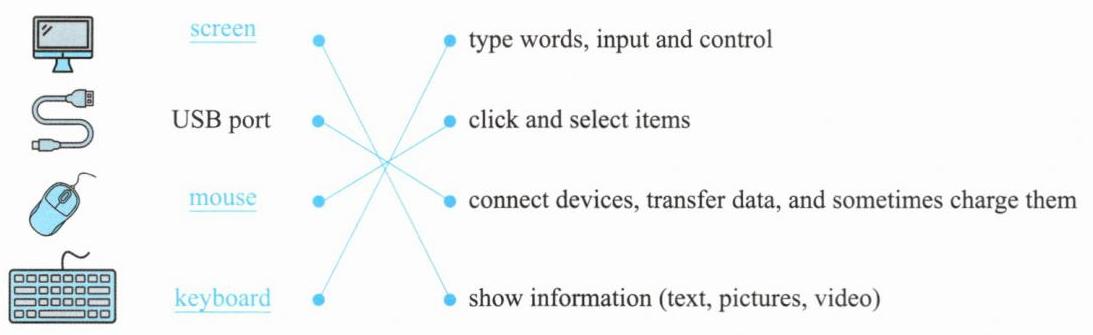
【分析】本题是电脑部件与功能的匹配题,解题思路为:1. 识别左侧的电脑部件,从上到下依次为显示器、USB端口、鼠标、键盘,对应英文单词分别是screen、USB port、mouse、keyboard;2. 理解右侧各功能短语的含义:type words, input and control(打字、输入和控制)、click and select items(点击和选择项目)、connect devices, transfer data and sometimes charge them(连接设备、传输数据,有时还能充电)、show information (text, pictures, video)(显示信息,如文本、图片、视频);3. 将部件与对应的功能匹配:显示器对应显示信息,USB端口对应连接设备传数据,鼠标对应点击选择,键盘对应打字输入。
【解析】1. 填写左侧部件的英文:从上到下依次为screen、USB port、mouse、keyboard;2. 匹配部件与功能:screen对应show information (text, pictures, video);USB port对应connect devices, transfer data and sometimes charge them;mouse对应click and select items;keyboard对应type words, input and control。
【答案】
【知识点】电脑部件功能、英语词汇匹配
【点评】本题为基础的电脑设备英文与功能匹配题,考察常见电脑部件的英文名称及对应功能,是入门级的英语与生活常识结合的题目,帮助学生了解电脑相关的英文表达。
【难度系数】0.2
【解析】1. 填写左侧部件的英文:从上到下依次为screen、USB port、mouse、keyboard;2. 匹配部件与功能:screen对应show information (text, pictures, video);USB port对应connect devices, transfer data and sometimes charge them;mouse对应click and select items;keyboard对应type words, input and control。
【答案】
【知识点】电脑部件功能、英语词汇匹配
【点评】本题为基础的电脑设备英文与功能匹配题,考察常见电脑部件的英文名称及对应功能,是入门级的英语与生活常识结合的题目,帮助学生了解电脑相关的英文表达。
【难度系数】0.2
Ⅲ. Read and finish the tasks(Shenshen 在使用电脑的过程中遇到了问题,Minmin 正在帮助她。读一读,完成任务)
Task 1: Read, choose and write(选择合适的句子完成对话,将字母代号填在横线上。有一项多余)
A. You should set a power-on password.
B. Let me help you search for (寻找) it online.
C. Restart (重启) your computer to fix common problems.
D. Never click on unknown links.
E. You can store (储存) important files in folders (文件夹).
F. Don’t worry. It’s in the Recycle Bin (回收站).

(Shenshen has some problems while using the computer. Minmin is helping her.)
Shenshen: Oh, no! I carelessly deleted my homework file!
Minmin: 1.
Shenshen: My sister, Xinxin, keeps using my computer without my permission (许可).
Minmin: 2.
Shenshen: I can’t find information about computer history.
Minmin: 3.
Shenshen: My desktop is so messy with many files.
Minmin: 4.
Shenshen: I got a strange email with an attachment (附件).
Minmin: 5.
Shenshen: OK, I’ve got it now. Thanks, Minmin.

Task 1: Read, choose and write(选择合适的句子完成对话,将字母代号填在横线上。有一项多余)
A. You should set a power-on password.
B. Let me help you search for (寻找) it online.
C. Restart (重启) your computer to fix common problems.
D. Never click on unknown links.
E. You can store (储存) important files in folders (文件夹).
F. Don’t worry. It’s in the Recycle Bin (回收站).
(Shenshen has some problems while using the computer. Minmin is helping her.)
Shenshen: Oh, no! I carelessly deleted my homework file!
Minmin: 1.
F
You can get it back.Shenshen: My sister, Xinxin, keeps using my computer without my permission (许可).
Minmin: 2.
A
Then she can’t turn on your computer.Shenshen: I can’t find information about computer history.
Minmin: 3.
B
Shenshen: My desktop is so messy with many files.
Minmin: 4.
E
Shenshen: I got a strange email with an attachment (附件).
Minmin: 5.
D
It might be a virus.Shenshen: OK, I’ve got it now. Thanks, Minmin.
答案
Task 1: 1. F 2. A 3. B 4. E 5. D
解析
【分析】首先通读对话,明确ShenShen遇到的5个电脑相关问题,再结合每个选项的语境匹配对应答案:1. ShenShen不小心删除作业文件,对应提到回收站的F选项;2. ShenShen说姐姐未经许可用电脑,对应建议设开机密码的A选项;3. ShenShen找不到电脑历史信息,对应提出网上搜索的B选项;4. ShenShen桌面文件杂乱,对应建议存重要文件到文件夹的E选项;5. ShenShen收到带附件的奇怪邮件,对应提醒别点未知链接的D选项。
【解析】根据对话语境逐一匹配:1. 删除的文件可从回收站找回,选F;2. 防止他人未经许可用电脑可设开机密码,选A;3. 找不到电脑历史信息可网上搜索,选B;4. 桌面文件杂乱可将重要文件存入文件夹,选E;5. 带附件的奇怪邮件可能是病毒,别点击未知链接,选D。
【答案】1.F 2.A 3.B 4.E 5.D
【知识点】英语补全对话、电脑基本操作常识
【点评】本题结合电脑使用场景,考查英语对话的语境匹配能力,同时涉及简单电脑知识,需要学生结合语境和生活常识选择合适句子,难度适中。
【难度系数】0.5
【解析】根据对话语境逐一匹配:1. 删除的文件可从回收站找回,选F;2. 防止他人未经许可用电脑可设开机密码,选A;3. 找不到电脑历史信息可网上搜索,选B;4. 桌面文件杂乱可将重要文件存入文件夹,选E;5. 带附件的奇怪邮件可能是病毒,别点击未知链接,选D。
【答案】1.F 2.A 3.B 4.E 5.D
【知识点】英语补全对话、电脑基本操作常识
【点评】本题结合电脑使用场景,考查英语对话的语境匹配能力,同时涉及简单电脑知识,需要学生结合语境和生活常识选择合适句子,难度适中。
【难度系数】0.5
