

 登录
登录
B
take safe for example personal use
Easy passwords are not safe online. Here are three pieces of advice for a much
21. ______ password.
First, it is good 22. ______ different things in a password, such as numbers and symbols. It's better than using numbers only.
Second, make your password long. 23. ______, make a password of nine letters, with numbers and symbols in it. Then it can 24. ______ hackers a long time to work it out!
Finally, never use 25. ______ information as a password. Use different passwords for different things. Change your passwords every 90 days.
take safe for example personal use
Easy passwords are not safe online. Here are three pieces of advice for a much
21. ______ password.
First, it is good 22. ______ different things in a password, such as numbers and symbols. It's better than using numbers only.
Second, make your password long. 23. ______, make a password of nine letters, with numbers and symbols in it. Then it can 24. ______ hackers a long time to work it out!
Finally, never use 25. ______ information as a password. Use different passwords for different things. Change your passwords every 90 days.
答案
safer
; to use
; For example
; take
; personal
; to use
; For example
; take
; personal
五、阅读理解。
①Every time you go online, you leave a digital footprint(脚印). This is just like a real footprint. It tells where you have been, how long you stayed online and what you have been doing there. It's easy to get the information and show your digital footprints every time you send emails, messages and photos. What should you do?
②Don't forget to close the pages with your information when you leave a website, especially if you are using a shared computer.
③Don't tell anyone your passwords and don't write them down in a place that everybody can see. Make them more difficult by using both letters and numbers.
④Remember your favourite websites by looking over the browsing(浏览)history and the bookmark on your computer or your mobile phone. This is a way that your digital footprints can work in your favour, but remember to clear your browsing history from time to time.
⑤If you want to post some words online, you don't have to use your real name. You can use a nickname instead.
⑥Protect your personal information online. Be careful with strangers. You'd better not share your own information with them and you should always think twice before sharing your information.
⑦All kinds of people are interested in your digital footprints. It's now quite common for people to look over some personal information online before they offer someone a job. There are cases of people having missed out on jobs because their digital footprints didn't make them look good. So remember: keep safe, don't put too much personal information online and always think carefully before you post something. Ask yourself, "Would I be happy for everyone to see this?"
( ) 26. How do you leave a digital footprint?
A. By walking.
B. By using the internet.
C. By writing letters.
D. By talking to people.
( ) 27. The underlined words “work in your favour” in Paragraph 4 mean ______.
A. your browsing history is part of your digital footprints
B. you can do your favourite work online
C. digital footprints can sometimes do good things for you
D. you can work for websites with the help of digital footprints
( ) 28. What can we learn from the passage?
A. We should not get online at all.
B. We should be careful while going online.
C. We should use our own names online.
D. We should be very worried about going online.
( ) 29. Which of the following is the best structure of the passage?
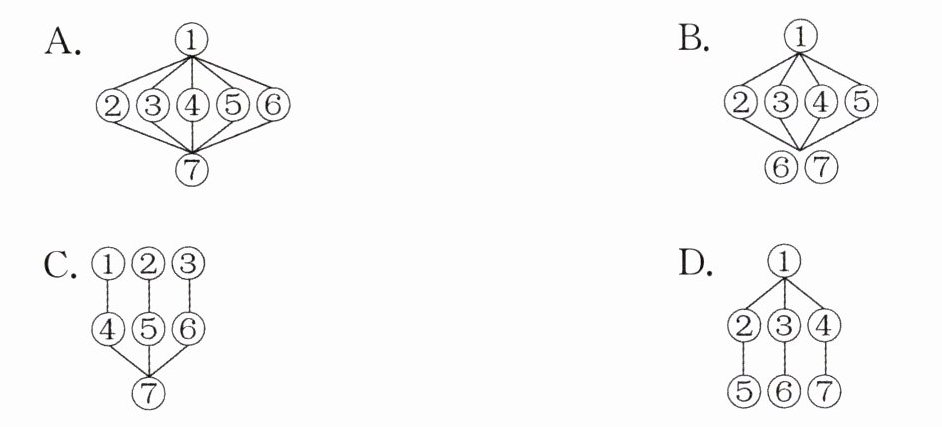
①Every time you go online, you leave a digital footprint(脚印). This is just like a real footprint. It tells where you have been, how long you stayed online and what you have been doing there. It's easy to get the information and show your digital footprints every time you send emails, messages and photos. What should you do?
②Don't forget to close the pages with your information when you leave a website, especially if you are using a shared computer.
③Don't tell anyone your passwords and don't write them down in a place that everybody can see. Make them more difficult by using both letters and numbers.
④Remember your favourite websites by looking over the browsing(浏览)history and the bookmark on your computer or your mobile phone. This is a way that your digital footprints can work in your favour, but remember to clear your browsing history from time to time.
⑤If you want to post some words online, you don't have to use your real name. You can use a nickname instead.
⑥Protect your personal information online. Be careful with strangers. You'd better not share your own information with them and you should always think twice before sharing your information.
⑦All kinds of people are interested in your digital footprints. It's now quite common for people to look over some personal information online before they offer someone a job. There are cases of people having missed out on jobs because their digital footprints didn't make them look good. So remember: keep safe, don't put too much personal information online and always think carefully before you post something. Ask yourself, "Would I be happy for everyone to see this?"
( ) 26. How do you leave a digital footprint?
A. By walking.
B. By using the internet.
C. By writing letters.
D. By talking to people.
( ) 27. The underlined words “work in your favour” in Paragraph 4 mean ______.
A. your browsing history is part of your digital footprints
B. you can do your favourite work online
C. digital footprints can sometimes do good things for you
D. you can work for websites with the help of digital footprints
( ) 28. What can we learn from the passage?
A. We should not get online at all.
B. We should be careful while going online.
C. We should use our own names online.
D. We should be very worried about going online.
( ) 29. Which of the following is the best structure of the passage?
答案
B
; C
; B
; A
; C
; B
; A
