

 登录
登录
五、阅读理解。
①Every time you go online, you leave a digital footprint (脚印). This is just like a real footprint. It tells where you have been, how long you stayed online and what you have been doing there. It's easy to get the information and show your digital footprints every time you send emails, messages and photos. What should you do?
②Don't forget to close the pages with your information when you leave a website, especially if you are using a shared computer.
③Don't tell anyone your passwords and don't write them down in a place that everybody can see. Make them more difficult by using both letters and numbers.
④Remember your favourite websites by looking over the browsing(浏览)history and the bookmark on your computer or your mobile phone. This is a way that your digital footprints can work in your favour, but remember to clear your browsing history from time to time.
⑤If you want to post some words online, you don't have to use your real name. You can use a nickname instead.
⑥Protect your personal information online. Be careful with strangers. You'd better not share your own information with them and you should always think twice before sharing your information.
⑦All kinds of people are interested in your digital footprints. It's now quite common for people to look over some personal information online before they offer someone a job. There are cases of people having missed out on jobs because their digital footprints didn't make them look good. So remember: keep safe, don't put too much personal information online and always think carefully before you post something. Ask yourself, "Would I be happy for everyone to see this?"
(
A. By walking.
B. By using the internet.
C. By writing letters.
D. By talking to people.
(
A. your browsing history is part of your digital footprints
B. you can do your favourite work online
C. digital footprints can sometimes do good things for you
D. you can work for websites with the help of digital footprints
(
A. We should not get online at all.
B. We should be careful while going online.
C. We should use our own names online.
D. We should be very worried about going online.
(
①Every time you go online, you leave a digital footprint (脚印). This is just like a real footprint. It tells where you have been, how long you stayed online and what you have been doing there. It's easy to get the information and show your digital footprints every time you send emails, messages and photos. What should you do?
②Don't forget to close the pages with your information when you leave a website, especially if you are using a shared computer.
③Don't tell anyone your passwords and don't write them down in a place that everybody can see. Make them more difficult by using both letters and numbers.
④Remember your favourite websites by looking over the browsing(浏览)history and the bookmark on your computer or your mobile phone. This is a way that your digital footprints can work in your favour, but remember to clear your browsing history from time to time.
⑤If you want to post some words online, you don't have to use your real name. You can use a nickname instead.
⑥Protect your personal information online. Be careful with strangers. You'd better not share your own information with them and you should always think twice before sharing your information.
⑦All kinds of people are interested in your digital footprints. It's now quite common for people to look over some personal information online before they offer someone a job. There are cases of people having missed out on jobs because their digital footprints didn't make them look good. So remember: keep safe, don't put too much personal information online and always think carefully before you post something. Ask yourself, "Would I be happy for everyone to see this?"
(
B
) 25. How do you leave a digital footprint?A. By walking.
B. By using the internet.
C. By writing letters.
D. By talking to people.
(
C
) 26. The underlined words "work in your favour" in Paragraph 4 mean .A. your browsing history is part of your digital footprints
B. you can do your favourite work online
C. digital footprints can sometimes do good things for you
D. you can work for websites with the help of digital footprints
(
B
) 27. What can we learn from the passage?A. We should not get online at all.
B. We should be careful while going online.
C. We should use our own names online.
D. We should be very worried about going online.
(
A
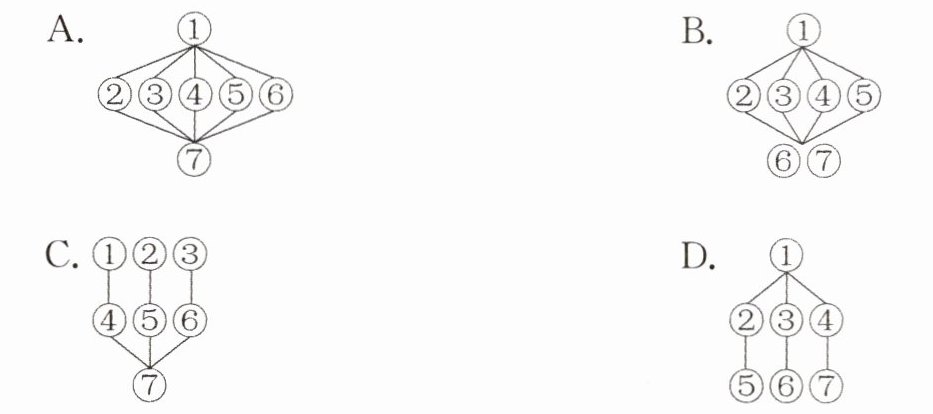
) 28. Which of the following is the best structure of the passage?答案
25.B 26.C 27.B 28.A
解析
【分析】
本题为英语阅读理解题,需结合原文内容逐一分析各题目:
1. 第25题:定位原文第①段关键句,明确数字脚印的产生方式,据此判断选项。
2. 第26题:结合第④段语境,分析短语所在句子的含义,推测“work in your favour”的意思。
3. 第27题:通读全文,把握文章主旨,逐一排除错误选项,得出正确结论。
4. 第28题:梳理文章段落逻辑,分析各部分的作用,匹配对应的结构选项。
【解析】
25. 细节理解题。根据原文第①段“Every time you go online, you leave a digital footprint (脚印)”,可知上网时会留下数字脚印,故选B。
26. 词义猜测题。第④段提到通过浏览历史记住喜欢的网站,这是数字脚印对你有利的方面,“work in your favour”意为“对你有利”,故选C。
27. 主旨大意题。全文围绕上网时保护个人信息、谨慎上网展开,A选项“完全不上网”不符合文意,C选项“用真实姓名”与原文第⑤段不符,D选项“非常担心上网”表述不当,故选B。
28. 文章结构题。文章第①段引出数字脚印的概念,第②-⑥段给出具体上网安全建议,第⑦段总结强调上网安全,对应选项A的结构,故选A。
【答案】
25.B 26.C 27.B 28.A
【知识点】
英语阅读理解,细节理解,词义猜测,文章结构
【点评】
本题考查英语阅读理解的多种核心题型,需要学生具备快速定位原文信息、理解词义及分析文章结构的能力,整体难度适中,适合初中阶段学生练习。
【难度系数】
0.6
本题为英语阅读理解题,需结合原文内容逐一分析各题目:
1. 第25题:定位原文第①段关键句,明确数字脚印的产生方式,据此判断选项。
2. 第26题:结合第④段语境,分析短语所在句子的含义,推测“work in your favour”的意思。
3. 第27题:通读全文,把握文章主旨,逐一排除错误选项,得出正确结论。
4. 第28题:梳理文章段落逻辑,分析各部分的作用,匹配对应的结构选项。
【解析】
25. 细节理解题。根据原文第①段“Every time you go online, you leave a digital footprint (脚印)”,可知上网时会留下数字脚印,故选B。
26. 词义猜测题。第④段提到通过浏览历史记住喜欢的网站,这是数字脚印对你有利的方面,“work in your favour”意为“对你有利”,故选C。
27. 主旨大意题。全文围绕上网时保护个人信息、谨慎上网展开,A选项“完全不上网”不符合文意,C选项“用真实姓名”与原文第⑤段不符,D选项“非常担心上网”表述不当,故选B。
28. 文章结构题。文章第①段引出数字脚印的概念,第②-⑥段给出具体上网安全建议,第⑦段总结强调上网安全,对应选项A的结构,故选A。
【答案】
25.B 26.C 27.B 28.A
【知识点】
英语阅读理解,细节理解,词义猜测,文章结构
【点评】
本题考查英语阅读理解的多种核心题型,需要学生具备快速定位原文信息、理解词义及分析文章结构的能力,整体难度适中,适合初中阶段学生练习。
【难度系数】
0.6
